
When a Rust server refuses or kicks a player, the game shows the reason as a short English line. The server writes these lines itself, and they show which check failed: game version, Steam, anti-cheat, a ban, or Premium. Below is what each one means and what to do about it. The texts are taken from the Rust server code (build 26431843, November 2026).
- Client update required
- update Rust in Steam
- Steam Auth Timeout
- Steam didn't answer the server within 30 seconds
- Steam Auth: banned
- a ban on this server
- gamebanned, vacbanned
- account ban in Rust, on all servers
- premium_account_required
- server only for accounts with Premium
How the server checks a player
The checks run one after another, and the first one that fails stops the join. So the error text tells you where to look for the cause.
- Version: the game protocol and branch (regular Rust or the test Staging Branch) must match the server.
- The server's ban list.
- Steam: confirms the account is real and owns Rust, and reports bans.
- Easy Anti-Cheat: Rust's anti-cheat, it works through Epic Online Services.
- Shared ban list: if the server is connected to such a server network list.
- Premium: only on servers with this mode.
- Whether another player with the same account is on the server, and whether the game build is older than the server requires.
A player gets 60 seconds for all checks. If Steam and the anti-cheat don't finish in time, the server disconnects them with the reason Authentication Timed Out.
Game version: Client update required
| In-game text | What it means | What to do |
|---|---|---|
| Wrong Connection Protocol: Client update required! | your Rust is older than the server | close Rust and wait for the update in Steam |
| Client update required. Close Rust and apply update from Steam. | same: the game build is older than the server requires | close Rust, update it in Steam |
| Incompatible Version | game and server versions don't match | update Rust; if that doesn't help, the server isn't updated yet |
| Wrong Connection Protocol: Server update required! | the other way around: the server is older than your game | wait for the admin to update the server, or join another one |
| Wrong Client Branch: Staging clients can't join release servers! | the test Rust - Staging Branch is running | start the regular Rust from your library |
These errors show up most often on big update day: Facepunch releases the update on the first Thursday of the month, together with the wipe (see the wipe schedule). The game and the servers don't update in the same minute, and until one side is updated, the versions won't match.
Steam errors: Steam Auth
The server asks Steam who is connecting and waits 30 seconds for an answer. Steam replies with a status, and the server turns it into one of the lines below.
| In-game text | What it means | What to do |
|---|---|---|
| Steam Auth Timeout: No auth response | Steam didn't answer the server within 30 seconds | restart Steam and Rust; if Steam is failing for everyone, wait |
| Steam Auth Failed | Steam refused without details: the account isn't online in Steam, Steam was signed in from another device, there's no license, or the login ticket is invalid | restart Steam, check whether Rust is open on another computer |
| Steam Auth: banned | you or the copy's owner is on this server's ban list | other servers let you in; only this server's admin can lift the ban |
| Steam Auth: gamebanned | Steam reported a game ban in Rust | no server will let the account in |
| Steam Auth: vacbanned | Steam reported a VAC ban in Rust | no server will let the account in |
The copy owner matters for Family Sharing. If you got Rust from a relative and the server has banned them, the server won't let you in either. See how game sharing works in the article on Steam Family Sharing.
Steam can also revoke your session during play. Then the reason starts with “Steam:” followed by the Steam status, for example Steam: Invalid, when Steam was signed in from another computer or lost its connection. If the status is a ban (Steam: VACBanned or Steam: PublisherBanned), the server also posts in global chat that the player was disconnected for an anti-cheat ban.
Anti-cheat errors: EAC
Easy Anti-Cheat is Rust's anti-cheat. When it requires a player to be disconnected, the server prints "EAC:" followed by the anti-cheat's own text. The Rust server doesn't make that text up, it passes it along as is. If the reason is an anti-cheat ban, permanent or temporary, the server chat shows the line "Kicking <name> (banned by anticheat)". With a permanent ban, the server immediately removes everything that player built on the map.
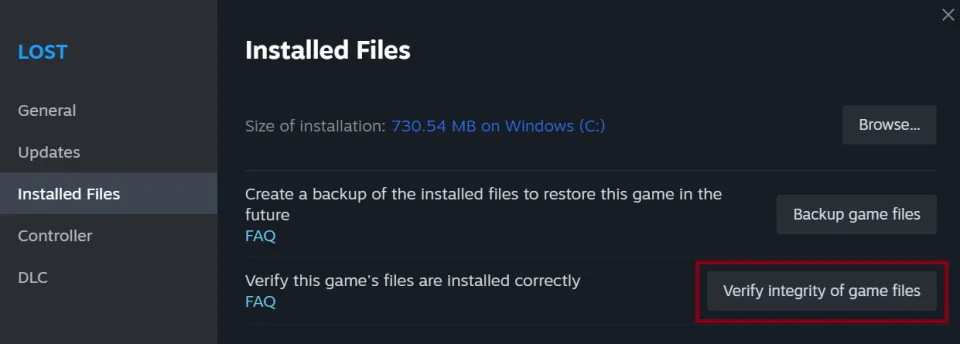
The line EAC: Verify ID token means the anti-cheat couldn't verify your sign-in through Epic Online Services. Restarting Rust from Steam usually helps. If the anti-cheat errors repeat on every server, verify the game files: in your Steam library, right-click Rust, go to Properties..., then Installed Files, and click Verify integrity of game files.
Server ban: You are banned from this server
This is a ban from the admins of that specific server. In parentheses, the server shows the note the admin left when banning you; if there isn't one, you'll see no reason given. For a temporary ban, the time remaining appears before the parentheses: You are banned from this server for <duration> (<reason>). The ban doesn't apply to other servers, and only the admins of this server can lift it.
Some server networks keep a shared ban list, so a ban on one of their servers applies to all of them. If that service doesn't respond and the server is set to let nobody in without a check, you'll see Centralized Ban Error: Network Error or Server Error. That's a server failure, not a ban, so try again later.
Premium servers: premium_account_required
Premium servers only let in accounts with Premium status. Facepunch launched them on March 13, 2025. The status is granted if Rust items in your Steam inventory are worth $15 or more (tradeable skins and items from the permanent store), and after a purchase it can take up to 20 minutes to appear. Facepunch has warned the threshold may change. For more, see the article on Premium and hardcore.
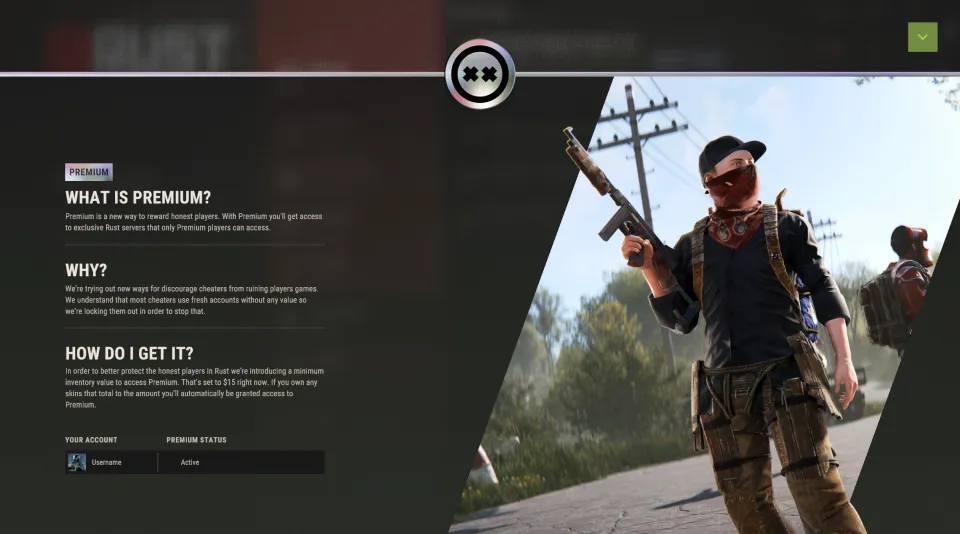
A Premium server rechecks the status during play too, by default no more than once every 5 minutes. If you sell or trade skins and the value drops below the threshold, the server disconnects you with premium_account_required.
Other reasons for disconnecting
| In-game text | What it means | What to do |
|---|---|---|
| Authentication Timed Out | Steam and anti-cheat checks took longer than 60 seconds | reconnect; if it repeats, restart Steam |
| You are already connected as a player! | another player with your account is already on the server, for example the previous session hasn't closed yet | wait a minute and join again |
| Idle for 30 minutes | you did nothing for 30 minutes(the default; the admin can change it) | just join again |
| Server Restarting, Server Shutting Down | the server is restarting or shutting down | wait |
| Packet Flooding, Invalid Packet | the server received too much data from the game, or corrupted data | reconnect |
You can also join a server by address from the console: press F1, type connect, then the server address. Useful console commands are collected in the article on Rust console commands.
Frequently asked questions
What to do if Rust shows Steam Auth Timeout?
The server didn't get a reply from Steam within 30 seconds. Restart Steam and Rust, then join again. If everyone gets the error on different servers, the problem is on Steam's side, so you'll have to wait.
What does Steam Auth: gamebanned mean in Rust?
Steam told the server that the account has a game ban in Rust. No server will let that account in. An admin ban, by contrast, only applies on that admin's server.
Why does it say Client update required when Rust is up to date?
The server needs a newer build than yours. Close Rust completely so Steam can download the update, then start it again. If there's no update, but the error is Wrong Connection Protocol: Server update required!, you need to wait for the server to be updated.
Can you lift a ban on a Rust server?
Only the server's admins can lift a server ban, so contact them where the server takes appeals. Rust's game ban (gamebanned) can't be lifted by the server.